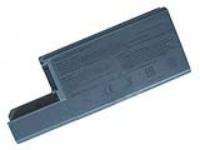
Dell Latitude D820 Laptop Battery gives you more life and very light in weight because this battery is made up of with Lithium Ion. 100% compatible with Universal AC Adapter we are selling at the very lowest price, Addition to this we are selling many other compatible batteries for all brands l reseller by batteries4laptop.
If you are looking for the best brand new Lithium Ion Replacement laptop battery Dell Latitude D820 Laptop Battery, D820 battery at the most preferred price with best quality product, you have come to the right place. We provide the highest quality battery for the reasonable price with the highest level of service compare to other website, all in a secure and convenient platform.
Our product range include replacement Dell Latitude D820 Laptop Battery, Dell Latitude D830 Laptop Battery for most major brands, including Dell, Apple, Compaq, HP, IBM, Lenovo, Sony and Toshiba)
Features
Specification of Dell Latitude D820 Laptop Battery
Replacement Dell D820 battery
Type: Li-ion, 9 cells
Voltage: 11.1V
True Capacity: 6600mAh
Unit Dimension: 207.5mm*82mm*22.2mm
Dell Latitude D820 Laptop Battery detailed features:
Dell Latitude D820 Laptop Battery is Lithium Ion Replacement laptop battery.
100% compatible with Universal AC Adapter.
Guaranteed to meet the expected specifications and its Reliable power gives dependable performance.
By using this Dell Latitude D820 Laptop Battery longest performance with no memory effect.
Lithium technology gives this Notebook Battery a long life, and light weight.
100% replacement battery.
Intelligent battery pack.
Manufactured By Hi-Capacity power product for Dell Latitude D820 Laptop Battery
Specifications
UL certificated cells inside! High Quality! Brand New Replacement Product, works as genuine parts, 100% OEM Compatible!!
Detailed Features
Compatible Part Number of Dell Latitude D820 Laptop Battery
Fit Laptop Model of Dell Latitude D820 Laptop Battery
Dell Latitude D820 Series, Dell Latitude D830 Series Dell Latitude D531 Series, Dell Precision M65 Series
BATTERY CARE INSTRUCTION
Barttery Do's:
The team atBatteries4laptopis driven with the aim of offering superior products, competitive pricing and responsive service. When charging the battery for the first time the device may indicate that charging is complete after just 10 or 15 minutes. This is a normal phenomenon with rechargeable batteries. Remove the battery from the device, reinsert it and repeat the charging procedure.
It is important to condition (fully discharge and then fully charge) the battery every two to three weeks. Failure to do so may significantly shorten the battery's life (this does not apply to Li-Ion batteries, which do not require conditioning). To discharge, simply run the device under the battery's power until it shuts down or until you get a low battery warning. Then recharge the battery as instructed in the user's manual.
If theDell Latitude D820 Laptop Battery will not be in use for a month or longer, it is recommended that it be removed from the device and stored in a cool, dry, clean place. It is normal for a battery to become warm to the touch during charging and discharging.
A charged battery will eventually lose its charge if unused. It may therefore be necessary to recharge the battery after a storage period.
Actual battery run-time depends upon the power demands made by the equipment. In the case of notebook computers, screen brightness, the use of the CPU, the hard drive, and other peripherals results in an additional drain upon the battery, effectively reducing the battery's run-time. The total run-time of the battery is also heavily dependent upon the design of the equipment. To ensure maximum performance of the battery, optimize the computer's power management features. Refer to the computer manual for further instructions.
Battery Tips
Do not short-circuit. A short-circuit may cause severe damage to the battery.
Your opinion is important to us.If
you have spotted a typo, discovered an incorrect price, or encountered a
technical issue on this page, we want to hear about it. Thanks again for your
feedback